Canonical is a technical SEO tag that signals to search engines, “this is the main (preferred) URL,” when there are the same or very similar contents on different pages. When Canonical is implemented correctly, Google, Yandex, and AI-based search systems (such as ChatGPT/Gemini) can resolve duplicate-content confusion better, and the authority of the main page strengthens more clearly.
Canonical URL What Is It?
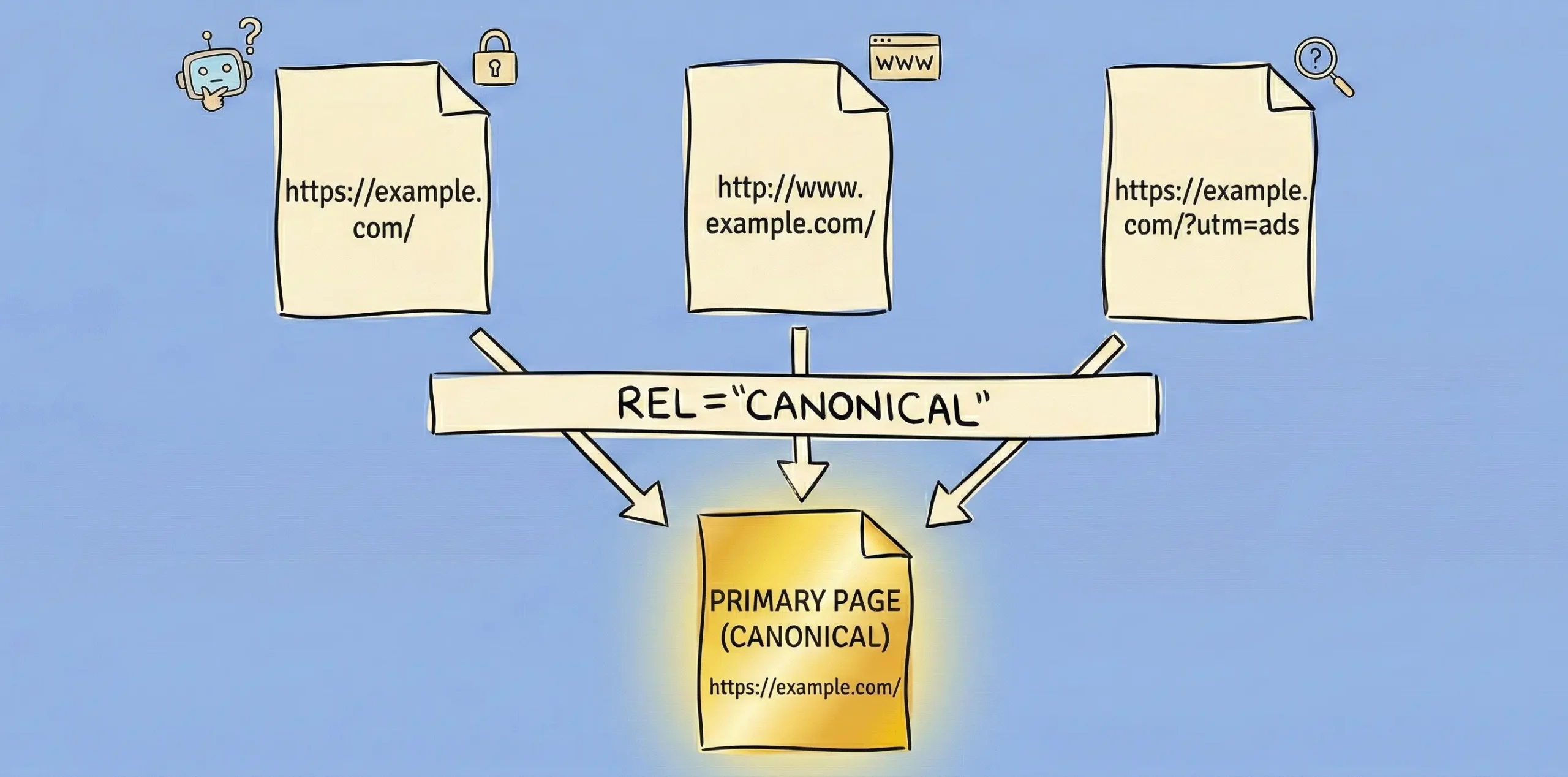
Canonical URL is the address of the page you want search engines to treat as the “original.” When you set a Canonical URL, similar pages consolidate ranking signals (link equity, content signals, etc.) largely on this main URL.
Example (the most common scenario):
Because of on-site filters or UTM parameters, the same product/page can open with different URLs:
In this case, the Canonical URL is generally chosen as the main page without parameters.
Canonical Tag How Is It Used?
Canonical tag is implemented with a link tag added to the <head> section of the page. Short answer: you guide the search engine by saying, “this page’s canonical URL is this.”
1) Canonical tag usage in HTML (most common)
Add it in the <head> area of the page in this format:
<link rel=”canonical” href=”https://site.com/example-url/” />
In practice, this structure is also called “canonical code.”
If the canonical code is written incorrectly (wrong URL, 404, http/https mismatch), it can harm canonical seo performance.
2) Self-referential canonical (recommended for most pages)
Self canonical is marking the page itself as canonical. It clarifies the “canonical link” structure especially for blog posts and category pages.
3) Which pages should receive canonical?
- Parameterized URLs (UTM, filter, sorting parameters)
- Very similar product variations (depending on strategy)
- Printable pages / alternative versions such as AMP (depending on your setup)
- Pagination/tag pages (should be decided carefully)
4) Most common mistakes when using canonical tag
- Canonical URL going to 404/301
- http → https mismatch
- Trailing slash difference (/sayfa vs /sayfa/)
- Having more than one canonical tag on a page
- Conflicts between canonical and noindex or robots signals
- Setting canonical to an irrelevant page (can trigger behaviors like soft 404)
Canonical SEO Importance
Canonical SEO reduces authority dilution caused by duplicate content, uses crawl budget more efficiently, and consolidates ranking signals into a single URL.
In practice, you see the importance of Canonical SEO most in these 4 areas:
- Cleans duplicate content signals: Google can sometimes be unsure which of the different URLs of the same content to show. Canonical tag clarifies this decision.
- Reduces link equity fragmentation: Not via canonical link from outside, but if links point to different URLs, authority gets fragmented. Canonical URL consolidates these signals in one place.
- Protects crawl budget: In e-commerce, filters, sorting, and variations can create thousands of unnecessary URLs. Canonical code minimizes unnecessary crawling.
- Creates a clearer source for AI results: In systems like ChatGPT/Gemini, being the “main version” of a page is an advantage for source selection. Canonical URL strengthens the “primary source” signal among different versions of the same content.
Other Technical SEO Practices
Canonical tag alone does not solve everything. If you want your canonical seo setup to be strong, you should also consider these technical SEO steps together:
Sitemap tells search engines, “these are the important pages I want indexed.” For this reason, having canonical URLs in the sitemap as much as possible strengthens the technical SEO side by preventing duplicate/parameterized URLs from muddying signals.
The robots file controls which areas bots can crawl or not. When configured correctly, it reduces crawling of unnecessary pages; when configured incorrectly, it can weaken canonical and indexing signals by preventing important pages from being crawled.
- Site speed (Core Web Vitals):
Site speed directly affects both SEO and Discover visibility. Even if you point to the “main page” with canonical, if the page is slow, user signals drop; this can challenge ranking and visibility performance.
Internal links are strong signals that show search engines which page is the “main source.” Having menu, category, breadcrumb, and in-content links point to the canonical URL helps consolidate authority into a single page.
Canonical Check List
- Does the Canonical URL return 200?
- Are HTTP/HTTPS, www/non-www consistent?
- Is there only one canonical tag?
- Is the correct canonical URL in the sitemap?
- Do internal links point to the canonical URL?
- Are parameterized URLs under control?
Conclusion
Canonical tag strengthens canonical SEO performance by clearly indicating the “main page” to search engines for similar/duplicate content. When Canonical URL selection and canonical link/canonical code implementation are configured correctly, technical SEO steps such as sitemap, robots.txt, site speed, and internal linking also support this signal, resulting in more stable rankings and visibility. If your site’s canonical structure is confusing, parameterized URLs are increasing, or you are experiencing indexing issues, you can contact me for SEO management. With a site-specific technical SEO analysis, let’s set up the canonical implementation and cleanly structure the entire infrastructure.