
FCP is a metric that measures the time until the first piece of content on the page (text, image, SVG, or non-white canvas) starts to appear on the screen.
The value of FCP on the SEO side is this: Google’s performance evaluations and user behavior (especially on mobile “waiting ≥ exit”) trigger each other. Improving FCP helps build a more stable “page experience” foundation on competitive pages in Google/Yandex/Bing because it also speeds up the chain leading to metrics like LCP/INP.
What Is FCP?
FCP (First Contentful Paint) is the time until the browser renders the first content element from the DOM when the user enters the page. Elements counted as “content” in FCP include text, images, non-white <canvas>, and SVG; iframe content is not included in the FCP calculation.
Which Elements Are Considered in the FCP Metric?
FCP measures not “the page fully loaded,” but the moment of the first visual feedback. Therefore, the factors that affect FCP are generally delays on the render path that “start the first paint”:
- Server response and network latency (TTFB/DNS/TLS): If the HTML arrives late, the browser cannot start rendering early.
- Render-blocking CSS: If critical CSS loads late, the first paint is delayed.
- JavaScript load and main thread blocking: Heavy JS parsing/execution can delay drawing the first content.
- Critical font and image behavior: If the first content is text, the font loading strategy can affect the first paint (especially on the first screen).
- Client-side rendering intensity: If most of the content is created later with JS, the first render moment can be pushed forward.
What Should the Ideal FCP Score Be?
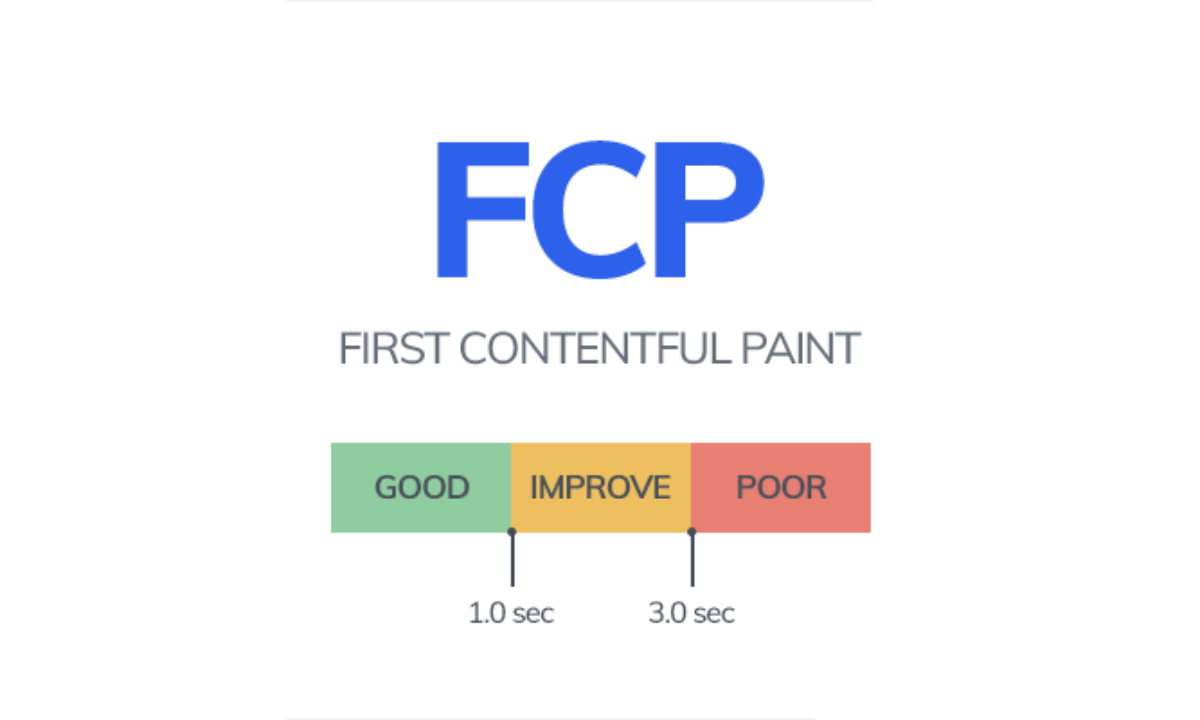
Google’s FCP thresholds are classified as follows (the evaluation approach is generally read with p75 logic as in Core Web Vitals):
- Good: ≤ 1.8 seconds
The user receives a fast “first content” signal; it is understood that the page is not blank.
- Needs improvement: 1.8 – 3.0 seconds
The first content is delayed; especially on mobile, the perception of “the page is slow” and exit behavior may increase.
- Poor: > 3.0 seconds
The user sees a blank screen for a long time; it is necessary to prioritize root causes (TTFB, render-blocking, JS load) in the performance chain.
How Is FCP Measured?
When measuring FCP, reading both lab and field data together is the healthiest approach; because lab tests diagnose, while field data represents real user experience.
- Google PageSpeed Insights: Provides Lighthouse-based lab metrics; also shows a CrUX/field summary on eligible pages.
- Lighthouse (Chrome DevTools): Ideal for seeing FCP and the “why is it delayed?” part (critical requests, render-blocking, main thread).
- Google Search Console – Core Web Vitals: Does not report FCP alone; but it helps you track “page experience” issues in URL groups with field data and prioritize root causes.
- CrUX (Chrome UX Report): Strong for reading real user trends (with mobile/desktop breakdown).
- WebPageTest: Provides a detailed answer to “why is the first paint delayed?” via waterfall with location/device profiles.
How to Optimize FCP?

The headings below are prepared in line with the most common warning clusters in PageSpeed/Lighthouse with a “what to do → why it works” logic.
Reduce TTFB (the starting lock of FCP)
If the HTML arrives late, the browser cannot start rendering; therefore cache, CDN, and server optimization directly speed up FCP. Especially as the response time of the first request improves, the FCP chain starts earlier.
Reduce render-blocking CSS
Bringing critical CSS forward, cleaning unused CSS, and deferring non-critical styles reduces the delay of the first paint. In FCP, the goal is “let the styles needed for the first screen come immediately, the rest later.”
Lighten the JavaScript load (free the main thread)
Heavy JS can delay the first paint with parsing, compile, and execute time. Reducing unnecessary third-party scripts, deferring non-critical JS, and shrinking the bundle speeds up FCP.
Prioritize critical resources correctly (preload/preconnect)
Correctly prioritizing resources like fonts/CSS needed on the first screen helps the browser paint the first content earlier. This step is effective especially if text appears late due to font delay.
Adjust the font strategy
If text is the first content, font loading behavior can affect FCP. Proper font behavior and, if possible, a self-host approach make the first content paint more stable.
Reduce client-side rendering weight (if possible SSR/pre-render)
If the first content is “built later” with JS, FCP is naturally delayed. Architectural choices that present critical content earlier can improve FCP and the overall perception.
Conclusion
FCP directly affects perceived speed and page experience performance because it is the first threshold that gives the user the signal “the site is working and content is coming.” When you improve FCP along the TTFB + render-blocking + JS load axis, both the Core Web Vitals chain progresses more healthily and a more stable performance foundation is formed on the SEO side.