

CLS is a visual stability metric within Core Web Vitals that measures the unexpected shifting/movement of elements on a page during loading.
Just as much as website speed, “keeping the page stable” is also critical: if an element shifts while clicking a button, misclicks happen, user trust decreases, and engagement weakens especially on mobile. Therefore, CLS optimization is a “small but high-impact” fix for competitive pages that want to stand out in Google and AI searches.
What Is CLS?
CLS (Cumulative Layout Shift) is a metric measured not in seconds but as a score (unitless) that calculates how much and to what extent elements within the viewport move while the user is viewing the page. CLS considers not only the “loading moment” but also unexpected shifts that occur while the page is being viewed.
Which Elements Are Considered in the CLS Metric?
What CLS counts as a “shift” is the movement of elements in the visible area at a time the user does not expect. The elements that most commonly cause CLS are:
- Images without dimensions: If <img> or the image container does not have width/height (or aspect-ratio) defined, the browser cannot reserve space, and when the image loads it pushes the content.
- Ad slots without dimensions: When no space is reserved before the ad slot loads, content shifts down/sideways.
- Embeds/iframes without dimensions: When elements like YouTube, maps, social embeds load, the layout reflows.
- Dynamically inserted content: Top banners, pop-ups/cookie bars, “campaign” strips, or blocks injected later cause content to jump.
- Web font loading behavior: When the font arrives late, the fallback → final font switch can change line metrics and shift the text (FOUT/FOIT effects).
- Late-loading critical CSS / layout calculations: If the stylesheet is applied late, the initial layout of the page can change and shifting can occur.
Note: Changes triggered by user actions such as accordions/tabs are considered “expected,” so CLS logic works differently there; the problem is generally elements that “jump on their own.”
What Should the Ideal CLS Score Be?
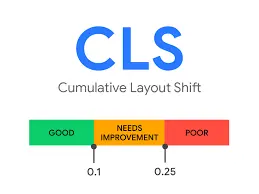
According to Google’s thresholds, CLS is evaluated as follows (target metric: 75th percentile):
- Good: ≤ 0.1
The page looks stable; the user does not experience misclicks/reading disruption.
- Needs improvement: 0.1 – 0.25
There are shifts felt from time to time; especially on mobile, trust and engagement can drop.
- Poor: > 0.25
Noticeable and frequent shifts occur; user experience becomes clearly weak and it is a priority issue on the technical SEO side.
How Is CLS Measured?
Practical tools you can use to measure the CLS metric:
- Google PageSpeed Insights: It provides lab measurement + CrUX (field) summary on eligible pages; if CLS is high, you see which opportunities appear.
- Lighthouse (Chrome DevTools): It is a lab test; it is useful for catching layout shifts and finding which elements cause the shift.
- GSC Core Web Vitals report: It lists CLS issues as URL groups with field data; “mobile/desktop” is tracked separately.
- WebPageTest: It performs detailed analysis in a lab environment with different device/location profiles; it is very useful for the question “at what moment does it shift?”
How to Optimize CLS?

The following items are arranged according to the root causes most frequently emphasized in Google’s CLS optimization guide. Under each heading, there is a “why it shifts + what you should do” logic.
Always define dimensions for images and media
If images (and videos) do not reserve space in advance with width/height or at least aspect-ratio, they push content when they load. Especially for hero images and in-content images, this is the most common cause of CLS.
Reserve “space” for ads/iframe/embed areas
If an ad slot or embed area loads later, first set a fixed container height (or use a responsive but reserved ratio). Blocks that “load dynamically but have no reserved space” make the page jump.
Do not “inject” dynamic content at the top
For elements like cookie notices, campaign bars, app banners, position them as overlays instead of pushing content from the top, or reserve their space from the beginning. Blocks that jump in while the user is reading increase CLS.
Stabilize your web font strategy
Font switching can change text metrics and cause shifting. A proper font-display behavior, preferably self-hosting, and fallback metric matching reduce CLS.
Do not delay critical CSS; clarify the layout at the first load
If CSS is applied late, the initial layout is drawn “wrong,” then shifts occur while it is corrected. Loading critical styles early and reducing unnecessary CSS/JS load increases stability.
Use transform instead of layout for animations
Instead of moving an element with values like top/left/height that affect layout, moving it with transform gives more stable results; the page does not reflow. (Especially in headers, sticky bars, expandable components.)
Why Is the CLS Metric Important?
CLS reduces the “jumping” effect during page load, protecting the user’s reading flow and click accuracy. High CLS can cause misclicks, interaction loss in form/CTA areas, and faster abandonment behavior especially on mobile, which weakens conversion performance. On the SEO side, CLS is part of the Core Web Vitals / Page Experience signals, helping sites with better page experience gain an advantage among similar content in competitive queries.
Conclusion
Because CLS measures the “jumping” issue on a page, it directly affects user trust and engagement; therefore it is a clear priority within Core Web Vitals and technical SEO. If your CLS score is above 0.1, we can quickly improve it with correct sizing + reserved space + font and dynamic content strategy. For your website to open more stably, keep users on the page, and help them move toward conversion more comfortably, within SEO manager we can create a site-specific CLS action plan with PageSpeed, Search Console, and WebPageTest data and implement it together.