LCP is a metric within Core Web Vitals that measures the time it takes for the largest content element in the visible area of a page to be painted on the screen, and it directly determines the “perceived” site speed. LCP improvement efforts strengthen both user experience and technical SEO performance, aiming for healthier crawling, better engagement, and stronger organic visibility on Google/Yandex/Bing.
What Is LCP?
LCP (Largest Contentful Paint) measures the time from when the user requests the URL until the largest content element in the viewport (the visible area on the screen) is rendered. This metric is one of the best representations of the user feeling “the main content is here, the page is loading.”
Which Elements Are Considered in the LCP Metric?
LCP does not consider “everything on the page”; it selects the largest element in the visible area as the candidate. In Google’s definition, this element is most often an image or video; on some pages it can also be a large block of text.
Main content types that can be LCP candidates (most common in practice):
- Images: Hero/cover image, featured product image (usually <img>).
- Video: Especially the video poster image (first frame/cover) can be an LCP candidate.
- Large block text: Block-level text areas such as a title + top block or a wide paragraph.
- Large visual areas coming from CSS background image: In some pages, the background image can also be the LCP element (especially hero areas).
The “full factor set” that makes up LCP (the main root causes that delay LCP):
- Slow server response (TTFB): If the first byte arrives late, LCP also starts late.
- Resource load delay: If the file of the LCP element (image/font/CSS) downloads late, LCP increases.
- Resource render delay: Even if the file downloads, render-blocking CSS/JS, font behavior, or layout calculations can delay LCP.
- Client-side rendering / heavy JS: If the main content is “built” later with JS (hydration/CSR), LCP often increases.
What Should the Ideal LCP Score Be?
According to Google’s Core Web Vitals thresholds, LCP is evaluated as follows (target metric: 75th percentile):
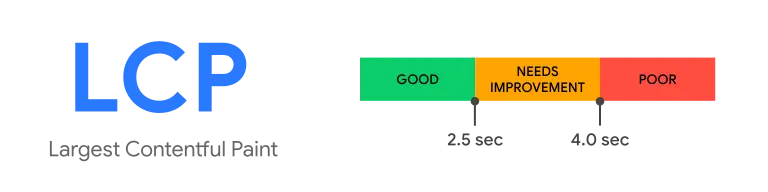
- Good: ≤ 2.5 seconds:
The vast majority of users see the main content quickly; this strengthens perceived site speed and page experience.
- Needs improvement: 2.5–4.0 seconds
The feeling of “the page is loading” is delayed; especially on mobile, bounce rate and conversions can be affected, and clear action is needed for LCP improvement.
- Poor: > 4.0 seconds
Because the main content arrives late, user experience becomes noticeably weak; issue groups form in Core Web Vitals reports and it should be prioritized in technical SEO.
How Is LCP Measured?
There are two data types in LCP measurement:
- Field data (real user data): This is the “truth” from an SEO perspective and evaluation is done according to the 75th percentile.
- Lab data (test data): It is ideal for diagnosis; but it may not always represent real users one-to-one.
Practical measurement by the tools you use:
- Google PageSpeed Insights: It provides a lab report and, on eligible pages, shows the CrUX (field) summary; it is very useful for diagnosis with “LCP element” and opportunity headings.
- Lighthouse: It is a lab test; you see what LCP selects as the “largest element” and performance recommendations.
- Google Search Console- Core Web Vitals report: It detects problems in “URL groups” entirely based on field data; the LCP definition and the 75% visit logic are clearly stated here.
- CrUX (Chrome UX Report): Used to read real user data trends (especially in mobile/desktop breakdown).
- Web Vitals (web-vitals library): For teams that want to set up measurement/monitoring inside the product, it supports collecting LCP from real users (RUM).
- WebPageTest: Used to analyze LCP in a lab environment with detailed waterfall using different location/device profiles; it is very effective for the question “why is it coming late?”
How to Optimize LCP?

Summarize the most common LCP issues you encounter in PageSpeed/Lighthouse with a “cause + solution” logic and it helps you improve your SEO score.
Optimize hero images (the most common cause of LCP)
Since the LCP element is an image on most sites (especially above the fold), serving the image in WebP/AVIF format, at the correct size, and with proper compression directly reduces LCP. Also, lazy-loading the LCP candidate increases LCP in most scenarios; you don’t want the main above-the-fold image to “arrive late.”
Reduce server response time (TTFB)
If TTFB is high, LCP improvement is not limited to “front-end”; cache, CDN, and hosting/DB performance come into play. If the first byte doesn’t arrive quickly, the browser starts downloading critical resources later and the LCP chain becomes longer.
Reduce render-blocking CSS/JS load
Critical CSS and JS can delay the browser painting the first screen. Cleaning unused CSS/JS, deferring/delaying non-critical scripts (defer/delay), and simplifying the “critical render path” has a clear impact on LCP.
Use preload and preconnect hints correctly
Preloading critical resources such as the image/font/CSS that are the LCP element helps the browser fetch that resource earlier. This makes a difference especially when the above-the-fold image is downloaded late.
Adjust font loading without breaking LCP and CLS
When fonts arrive late, text rendering can be delayed or the page can shift. Font strategy (self-host, appropriate loading behavior) is important for both LCP and visual stability.
Control third-party scripts (analytics, chat, ads)
Third-party scripts can occupy the CPU, disrupt critical resource order, and delay rendering. When improving LCP, reducing these scripts with the filter “is it really needed on the first screen?” is a quick win on many sites.
Reduce client-side rendering weight (if possible SSR/partial hydration)
In setups where the main content forms later with JS (heavy theme, heavy builder, SPA logic), LCP delays are common. Architectural choices (SSR/prioritization) that present critical content earlier can improve LCP.
Conclusion
LCP is one of the metrics in Core Web Vitals that most determines perceived site speed; therefore it should be considered as a “priority improvement” item in technical SEO. If you want to create and implement an LCP improvement plan specific to your site so that your website opens faster, keeps users on the page, and moves them more easily toward conversion, you can contact me for SEO manager; let’s build a clear action list with PageSpeed, Search Console, and WebPageTest data and improve it together.